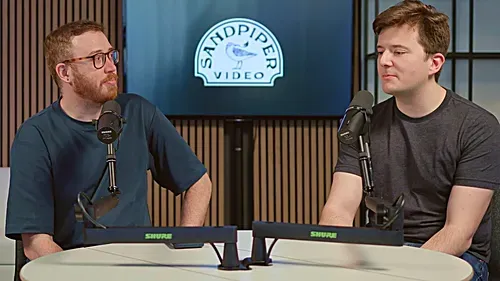
Most people who haven't recorded a podcast before assume there's more to it than there really is. Where do I look? What do I wear? Do I need to memorize anything? What if I mess up? Am I supposed to talk differently because there's a camera pointed at me?
The short answer is no.
A good podcast recording is a conversation. The cameras and microphones are there to capture it, not turn it into something else.
Think of the camera as another person at the table
This is probably the most useful thing we tell people who are new to recording.
Imagine you're having dinner with a few people. You naturally look at the person who's talking. You turn toward someone when you're answering their question. You react when somebody says something interesting. You don't spend the whole dinner staring rigidly at one person, and you don't forget that the quieter person sitting across from you is part of the conversation.
That's more or less how a video podcast works.
The people sitting with you are the people you're talking to. The main camera represents one more person at the table: the listener.
You don't have to stare into the lens every time you speak. In most conversations that would feel strange. Talk to the other people in the room. Listen to them. React to them. But remember that there's another person sitting with you who doesn't have the context of physically being there.
That changes little things. Instead of pointing across the room and saying "that thing over there," explain what you're talking about. If somebody mentions a name the audience may not know, give them enough context to follow along. If there's an inside joke between two people at the table, bring the listener in on it.
You're not performing for an audience. You're including them in the conversation.
Once people understand that, most of the camera anxiety goes away pretty quickly.
You don't need a podcast voice
Talk normally.
There is a tendency, especially with executives who are used to presentations, to switch into presentation mode when the red light turns on. Sentences get longer. Vocabulary gets more formal. Suddenly somebody who was telling a great story thirty seconds ago sounds like they're delivering prepared remarks at a conference.
We'd rather have the person from thirty seconds ago.
Speak the way you'd speak to a smart person sitting across from you. Use the words you'd actually use. Laugh when something is funny. Take a second to think when you need one.
Pauses are fine. So are ums. So is changing your mind halfway through an answer.
A podcast isn't a keynote.
Don't memorize your answers
Preparation helps. Memorization usually doesn't.
It's useful to know what the conversation is about and think through a few stories, examples, or numbers you might want to bring up. If there are facts you need to get exactly right, bring notes.
But don't write out your answers and try to remember them word for word.
Reading and reciting both show on camera. People start searching their memory for the next sentence instead of listening to the conversation happening in front of them.
Know what you want to say. Then say it in the moment.
If you don't quite land it, we can do it again.
Yes, you can redo something
Unless you're recording live, nothing says you get one shot at every sentence.
If you lose your train of thought, stop. Take a second. Start the thought again.
If you say something and immediately realize there's a much better way to put it, say so and take another pass.
If you're halfway through a complicated answer and everything has gone sideways, there's no prize for dragging it across the finish line.
One of the easiest things you can do for an editor is pause and start the sentence cleanly from the beginning. Trying to repair a sentence while you're still talking often creates something much harder to cut.
That doesn't mean we stop every time somebody says "um." The goal isn't a flawless performance. Most little imperfections are completely natural, and many disappear in the edit anyway.
Retakes are there when we need them.
The producer is there to help
In our studio, there's a producer in the room throughout the recording.
Their job isn't just to hit record.
They're listening to the conversation, watching the cameras, monitoring the microphones, and looking for anything that could become a problem later. If you're too far from the microphone, they'll tell you. If something needs another take, they'll ask for one. If you're wondering where to look, they'll point you in the right direction.
They can also help with the conversation itself.
Sometimes someone gives a good answer but buries the best part in the middle. We might ask them to say that piece again. Sometimes an explanation makes perfect sense to everyone in the room but needs one more sentence for someone watching at home. Sometimes somebody is nervous for the first ten minutes and hits their stride after that.
That's normal.
You're not expected to walk into a studio already knowing how to be on a podcast. That's part of why there's a producer there.
What should you wear?
Wear something you feel like yourself in.
For most podcasts, what you'd normally wear to meet the people you're recording with is a good place to start. You don't need to dress more formally because cameras are involved.
Solid colors and larger patterns tend to photograph well. Very fine stripes, tiny checks, and other tight repeating patterns can sometimes create strange patterns on camera.
The bigger concern is usually sound. Large necklaces, bracelets, noisy jackets, and fabrics that rub together can become surprisingly loud through a microphone.
If we're using a lavalier microphone, clothing can matter a little more because we need somewhere to attach it. For a normal studio podcast using microphones on stands, this is much less of an issue.
Glasses are fine. Gesturing is fine. Looking like yourself is generally a better choice than trying to construct a special camera version of yourself.
Once you're recording, forget about the cameras
We'll set the cameras before the conversation starts.
You don't need to follow them. You don't need to figure out which one is recording you. You don't need to maintain perfect posture because you think you're in a close-up.
Sit comfortably. Stay reasonably close to your microphone. Talk to the people you're there to talk to.
If we need something different, we'll tell you.
The best recordings usually happen when everyone forgets about the equipment.
A few small things make a difference
Have some water nearby. Put your phone away or silence it. Don't tap on the table or play with something next to the microphone. Try not to swivel constantly in your chair.
When another person is speaking, listen to them rather than preparing the next thing you're going to say. It makes the conversation better, and it looks better on camera too.
And give people room to finish their sentences. This becomes especially important when someone is joining remotely, where a slight delay can make people accidentally talk over one another.
None of these need to occupy much of your attention. They're just good habits once you're aware of them.
Bringing in a remote guest
A remote participant can join an in-studio conversation just like anybody else at the table.
In our studio, we route the remote guest into the room so everyone can see and hear them, and their video and audio become part of the recording.
The remote guest has a little more homework because we're not controlling their side of the production.
At minimum, they should use a computer in a quiet room, wear headphones or earbuds, plug the computer into power, and have a stable internet connection. A dedicated microphone is helpful if they have one. Good natural light from a window in front of them is usually better than complicated lighting equipment.
They should also join a little early so we can check everything before the actual conversation starts.
We've put together a separate guide for remote podcast guests that gets further into microphones, cameras, internet connections, lighting, and software.
The biggest adjustment once the conversation starts is simply leaving a little more space between speakers. Remote video has a small delay. If two people start talking at once, don't fight through it. Stop, let one person take it, and keep going.
It happens constantly.
The main thing to remember
Nobody listening to the finished podcast is grading your microphone technique.
They're listening because they're interested in the people and the conversation.
So think about a dinner table.
Talk to the people sitting around it. Listen when they're talking. Tell the story the way you'd actually tell it. Remember that the camera represents another person sitting there with you, and make sure that person can follow along too.
We'll take care of the cameras.